
Code in Comfort: The Best Wireless Keyboards for Programmers in 2024
For a programmer, a keyboard isn’t just a peripheral; it’s the primary instrument. It’s the conduit between thought and code, and the right one can make you faster, more comfortable, and more immersed in your work. In the age of clean, cable-free desks, a wireless keyboard is the ultimate upgrade for any developer’s setup.
But not all wireless keyboards are created equal. The needs of a programmer are specific: tactile feedback, ergonomic design, reliable connectivity, and the right layout are paramount.
This guide will break down the key features to look for and recommend the best wireless keyboards to elevate your coding game in 2024.
What Makes a Great Programming Keyboard?
Before we look at models, know what to prioritize:
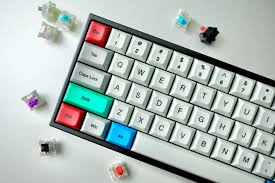
- Switch Type (The Feel & Sound): This is the most personal choice.
- Tactile (Browns): Provides a noticeable “bump” when the key is activated without a loud click. Offers great feedback for knowing you’ve pressed a key without being disruptive. A fantastic all-rounder.
- Clicky (Blues): Offers a tactile bump and a satisfying audible click. Loved by many for the rhythmic feedback but can be notoriously loud—avoid in open offices.
- Linear (Reds): Smooth keystroke from top to bottom with no bump or click. Often preferred by gamers for rapid presses, but some programmers find the lack of feedback leads to more typos.
- Layout & Form Factor:
- Full-Size (100%): Includes a number pad. Great for data entry but forces your mouse hand far to the side, which can cause shoulder strain.
- Tenkeyless (TKL or 80%): The programmer sweet spot. Cuts off the number pad for a more compact form that centers your typing and brings your mouse closer.
- 75%: A more compact TKL that squishes the function and navigation keys into a tighter layout. Saves space but has a steeper learning curve.
- Ergonomic: Split or curved designs that promote a more natural hand and wrist position. Can significantly reduce strain but require an adjustment period.
- Connectivity: Look for keyboards that offer both Bluetooth and a 2.4GHz USB dongle. Bluetooth is great for connecting to multiple devices (e.g., laptop and tablet), while the 2.4GHz dongle offers rock-solid, lag-free performance perfect for a desktop PC.
- Build Quality & Keycaps: A solid, weighty keyboard won’t slide around your desk. PBT keycaps are more durable and resistant to the shine that cheap ABS caps develop over time.
- Battery Life: You don’t want to be charging daily. Look for keyboards that boast weeks or even months of battery life, preferably with a USB-C charging port.
The Top Contenders: Best Wireless Keyboards for Coding
Here are the best wireless keyboards for programmers, catering to different preferences and budgets.
1. The All-Rounder Champion: Keychron K Series (e.g., K8 Pro)
Why it’s great for programming: Keychron has become the default recommendation for a reason. It perfectly bridges the gap between the custom keyboard world and off-the-shelf convenience. Models like the K8 Pro (TKL) or K4 (with numpad) offer:
- Superb Connectivity: Robust Bluetooth 5.1 and a 2.4GHz dongle.
- Excellent Switches: Hot-swappable sockets mean you can easily change your Gateron mechanical switches (tactile, clicky, or linear) later without soldering.
- Mac & Windows Native: Comes with dedicated Mac keys and a switch for Windows compatibility.
- Incredible Build: A solid aluminum frame, double-shot PBT keycaps, and programmable keys via VIA/QMK software.
- Great Battery Life: Up to 80 hours of use with RGB lighting on.
Ideal for: Almost every programmer. It’s the perfect starting point for those entering the mechanical keyboard world.
2. The Ergonomic Innovator: Kinesis Freestyle Pro
Why it’s great for programming: If you’re serious about preventing RSI (Repetitive Strain Injury), the Freestyle Pro is a top-tier choice.
- Fully Split Design: The two halves can be placed shoulder-width apart to keep your wrists, shoulders, and neck in a neutral, relaxed position.
- True Mechanical Switches: Uses Cherry MX Brown (tactile) or Red (linear) switches for a quality typing experience.
- Smart Defaults: Programmer-friendly shortcuts are baked into the layers, and it’s fully programmable.
- Tented: You can raise the inner edges for a more natural “handshake” wrist position.
Ideal for: Developers who type for 8+ hours a day and are experiencing wrist or shoulder pain, or those who want to proactively avoid it.
3. The Minimalist’s Dream: NuPhy Air75 V2
Why it’s great for programming: For programmers who value portability and a sleek, low-profile design without sacrificing performance.
- Ultra-Slim & Portable: Incredibly thin and lightweight, making it perfect for a minimalist desk or to throw in a bag.
- Excellent Low-Profile Switches: NuPhy’s own low-profile mechanical switches are surprisingly tactile and satisfying to type on.
- Full Feature Set: Despite its size, it packs in 2.4GHz/Bluetooth connectivity, hot-swappable switches, PBT keycaps, and vibrant RGB.
- Great for Travel: The perfect companion for a coding session at a café.
Ideal for: Developers with limited desk space, those who travel frequently, or anyone who prefers the feel of a low-profile keyboard.
4. The Premium Workhorse: Logitech MX Mechanical
Why it’s great for programming: Logitech’s MX series is synonymous with premium office gear, and the MX Mechanical brings that reliability to a mechanical form factor.
- Logitech’s “Perfect” Switches: Their tactile switches are quiet, comfortable, and provide just the right amount of feedback for long typing sessions.
- Unbeatable Ecosystem: Works seamlessly with Logi Bolt USB receiver or Bluetooth. The Logi Options+ software allows for deep customization and easy flow between up to three devices.
- Smart Illumination: The backlighting automatically turns off when your hands are away, saving battery.
- Superb Build Quality: It feels expensive, sturdy, and reliable.
Ideal for: The programmer in a corporate or shared workspace who values brand reliability, quiet operation, and seamless multi-device workflow.
5. The Budget-Friendly Powerhouse: Royal Kludge RK84
Why it’s great for programming: Proof that you don’t need to spend a fortune to get a capable wireless mechanical keyboard.
- Incredible Value: Packs in 2.4GHz, Bluetooth, and wired connectivity into a compact 75% layout.
- Hot-Swappable: A rare feature at this price point, allowing for future switch upgrades.
- Solid Performance: Reliable connection and decent battery life with a simple, functional design.
Ideal for: Students, beginners, or anyone on a tight budget who still wants a full feature set.
Final Verdict: Your Keyboard, Your Choice
The “best” keyboard is deeply personal. It’s about how the switches feel under your fingers and how the layout fits your flow.
- For most programmers, the Keychron K8 Pro is the safest and most highly recommended bet. It checks every box.
- If ergonomics are your top priority, invest in the Kinesis Freestyle Pro.
- If you value a clean, portable aesthetic, the NuPhy Air75 V2 is a stunning choice.
- For a premium, office-ready tool, the Logitech MX Mechanical is unmatched.
Your keyboard is your most intimate tool. Choose one that makes the act of coding a joy, not a chore. Happy coding
